WDACManager Architecture
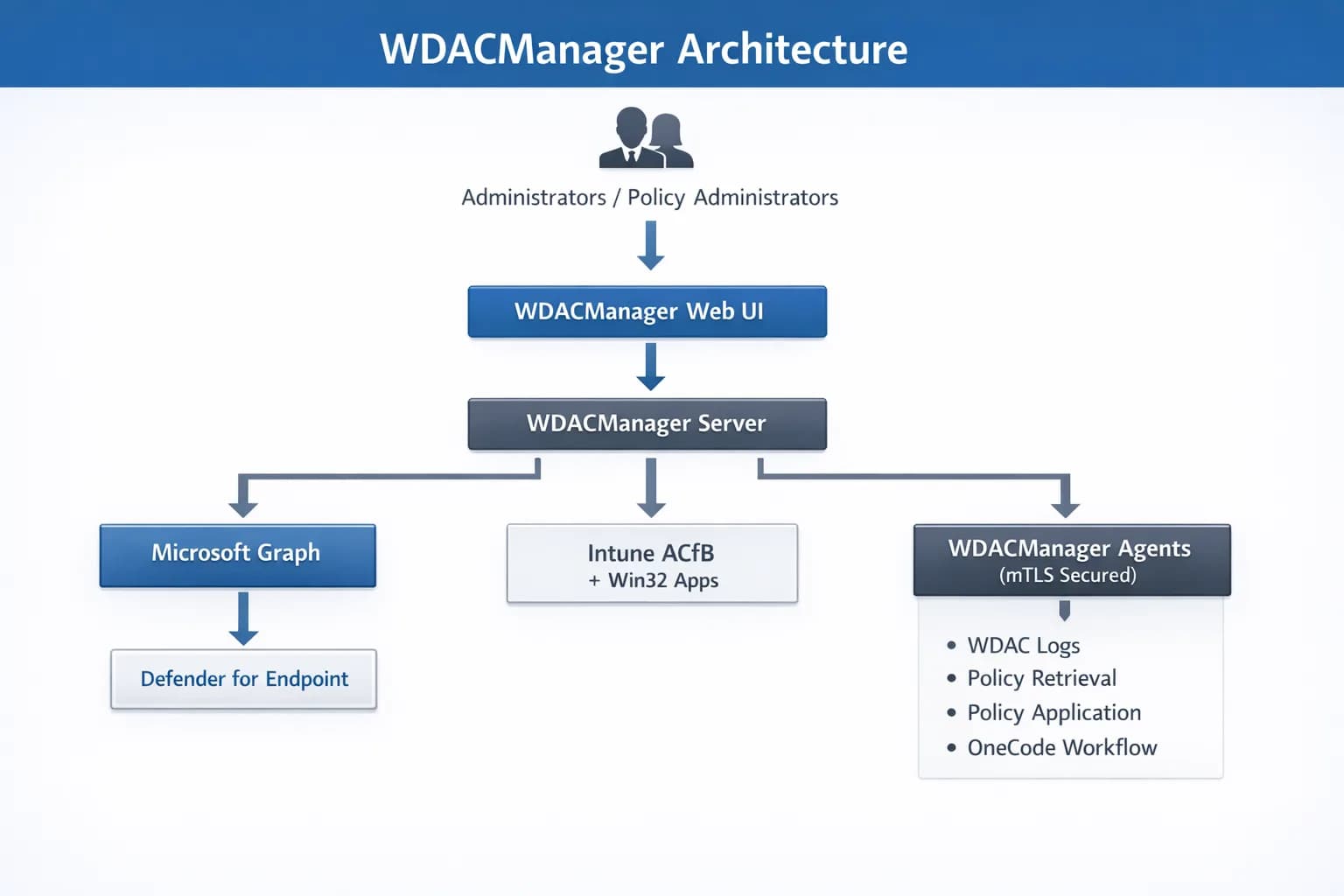
At a high level, WDACManager operates as a centralized platform for managing Windows Defender Application Control (WDAC) policies across enterprise environments. Administrators access the platform through a web interface where WDAC policies, telemetry, and deployment workflows are managed.
The platform integrates with Microsoft cloud services through Microsoft Graph to retrieve application execution telemetry from Microsoft Defender for Endpoint and to deploy WDAC policies using Microsoft Intune and Application Control for Business (ACfB).
A core architectural concept of WDACManager is the Application Abstraction model. Instead of managing individual WDAC rules such as hashes, certificates, or file paths, WDACManager groups these elements into logical Applications. Administrators build policies using these application objects, simplifying policy lifecycle management while still producing fully compliant WDAC policies.
WDACManager can optionally integrate with endpoint agents that communicate securely with the platform using mutually authenticated TLS (mTLS). These agents submit telemetry, retrieve policy updates, and apply policies locally on endpoints.
Web Interface
The WDACManager web interface provides administrators with a centralized platform for managing application control policies.
Administrators can:
- analyse application telemetry
- review application execution activity
- generate WDAC policies
- manage application rules
- deploy policies across endpoint groups
The interface communicates with backend services through a secure API.
Backend Services
The backend service implements the main operational logic of the platform.
Responsibilities include:
- authentication and authorization
- policy lifecycle management
- application abstraction and rule generation
- integration with Microsoft security services
- API services used by the management interface
Backend services expose APIs used by the web interface and by administrative workflows.
Agent Gateway
The Agent Gateway is responsible for secure communication with endpoints.
Endpoints communicate with the platform through outbound HTTPS connections to the gateway. The gateway validates endpoint identity using mutual TLS authentication and processes telemetry submitted by the endpoint agents.
Responsibilities include:
- device enrollment
- certificate lifecycle management
- event ingestion
- policy metadata retrieval
- policy distribution
Separating the gateway from the main backend limits the public attack surface of the platform.
Data Platform
WDACManager stores operational data in a PostgreSQL database.
Key data domains include:
- WDAC policies and rule structures
- application definitions
- device enrollment records
- telemetry events
- policy assignments
The data platform supports both operational workflows and analytical visibility into WDAC environments.
Endpoint Integration
Endpoint Integration
WDACManager integrates with endpoint agents that collect WDAC telemetry and enforce policy updates.
System Architecture Flow
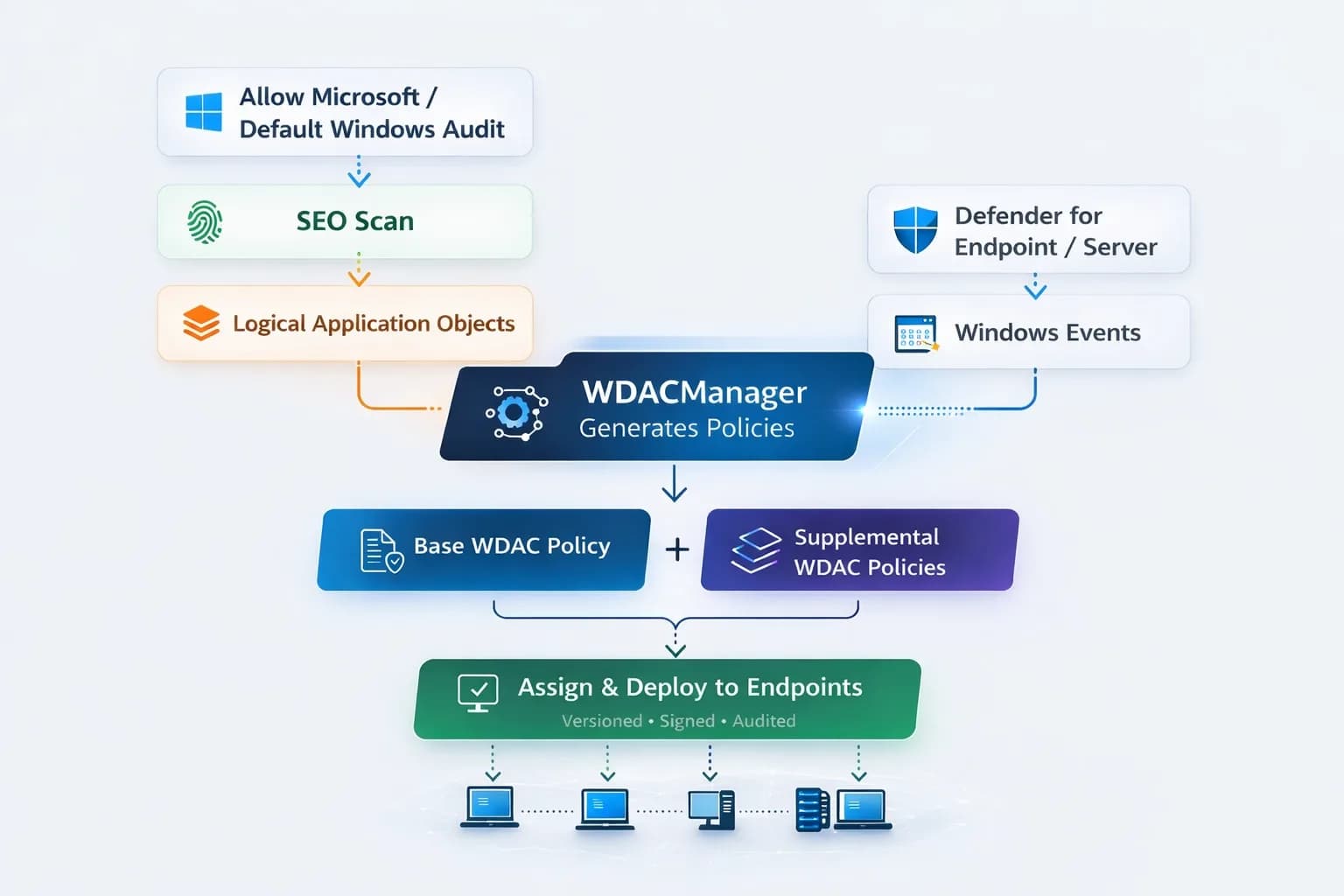
WDACManager is designed to support the full operational lifecycle of Windows Defender Application Control environments. At an architectural level, the platform separates data ingestion, logic abstraction, and deployment orchestration to ensure policy iterations are inherently structured and resilient.
Data and state flow through a controlled system cycle:
This architecture ensures that WDAC policies evolve through observable data transformations rather than fragmented manual modifications.
- Telemetry Ingestion: Endpoint agents or native integrations transmit application execution telemetry to the data pipeline via secure APIs.
- Data Normalization: The backend service processes and persists execution events within the PostgreSQL database for querying.
- Logical Mapping: The platform aggregates disparate identifiers (hashes, publisher certificates, file paths) into unified Application Abstraction objects.
- Policy Compilation: The backend dynamically generates new WDAC XML policy artifacts from updated application arrays and validates them against schemas.
- Automated Distribution: Compiled policies are pushed via API to Microsoft Intune or retrieved by the WDACManager agent during heartbeat synchronization.
- State Enforcement: Endpoints receive the configuration payloads, apply the binary WDAC policies locally, and report enforcement state back to the platform.
WDACManager OneCode Workflow
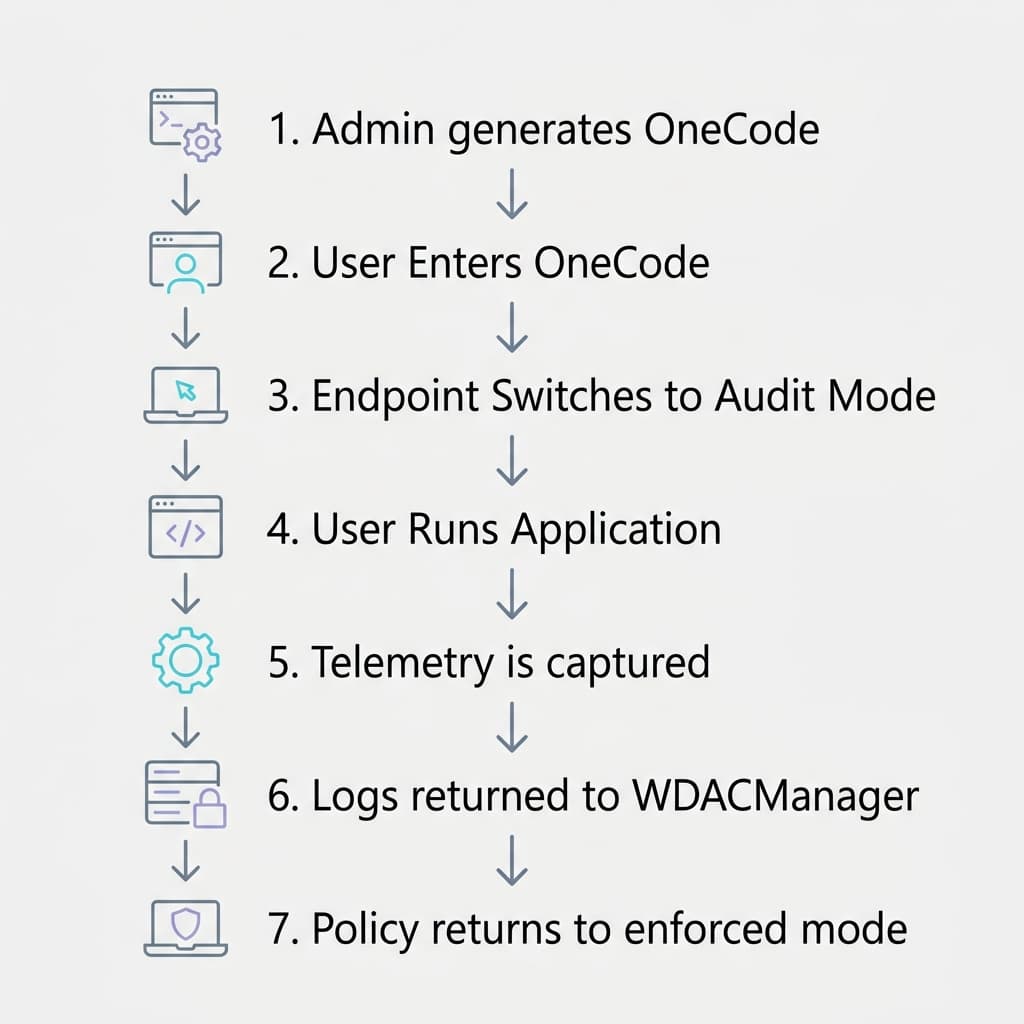
The OneCode workflow allows organizations to temporarily execute new or previously unseen software on endpoints protected by Windows Defender Application Control (WDAC) without permanently weakening security policies.
When a valid OneCode is entered through the WDACManager Local Client, the endpoint temporarily switches its WDAC policy from Enforced Mode to Audit Mode for a limited period of time. This controlled window allows a user to install or execute required software while maintaining full visibility of application activity.
During this period the WDACManager agent captures detailed execution telemetry including binaries, signing information, and execution events. This telemetry is securely transmitted to the WDACManager platform where administrators can review the activity and determine which rules are required to allow the application under normal enforcement conditions.
Once the OneCode window expires, the endpoint automatically returns to Enforced Mode, restoring full WDAC protection.
Key characteristics include:
- time‑limited authorization codes
- temporary switch from Enforced Mode to Audit Mode
- automatic return to enforced policy state
- full telemetry capture of executed applications
- centralized review and rule generation through WDACManager
- integration with the WDACManager policy lifecycle workflow